Enrich several clubs without a request per team
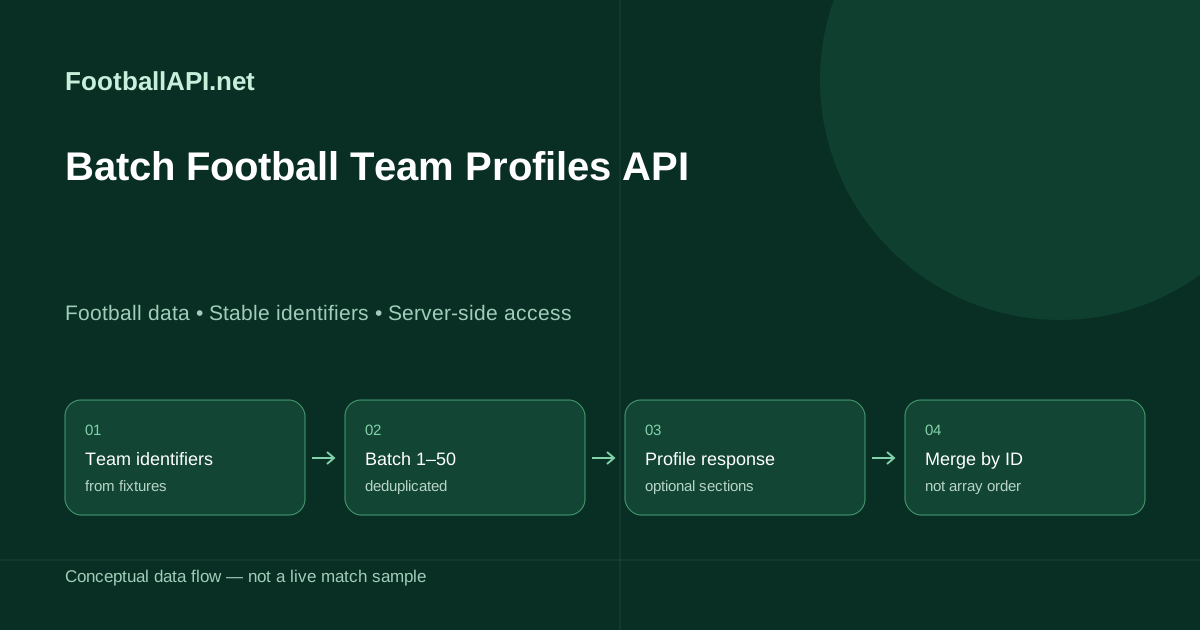
A match-centre application often discovers a set of clubs together: the participants in a competition, the teams in a day's fixtures or the opponents in a saved results archive. Fetching each profile individually works, but a bounded batch can reduce the number of enrichment requests and simplify preparation. The teams operation accepts up to fifty team IDs and returns the supplied profiles for that set. It is not a global club database export and does not discover additional teams on your behalf. Start with identifiers already obtained from appropriate football feeds, then request the profile content your product actually needs.
Constructing a valid teamIds request
Send an authenticated GET request to /api/v1/football/teams with the required teamIds parameter. Its value is a comma-separated list of one to fifty positive numeric IDs without spaces or underscore prefixes. Keep the identifiers as strings and encode the query normally. Deduplicate the list before sending it, and split a larger import into explicit batches rather than trying to bypass the fifty-ID limit. Growth or Pro and endpoint activation are required. Your server supplies X-API-Key; the browser should read your saved profile representation rather than receiving an account key or initiating its own profile import.
curl --fail-with-body --get 'https://footballapi.net/api/v1/football/teams' -H "X-API-Key: $FOOTBALLAPI_KEY" --data-urlencode 'teamIds=9260,9249'Match every profile using its returned identity
Never zip the returned array against the requested IDs by position. A profile can be omitted, and source ordering need not reproduce the order of your query. Instead, normalize the returned collection, extract each profile's own team identifier and merge it into a map keyed by that ID. Record which requested IDs remained unresolved after the merge. That lets a background worker retry only missing profiles without attaching one club's venue or squad to the next club in the list. Preserve your existing valid profile if a later batch omits it; an absent record is not an instruction to erase stored content.
Club identity, venues and optional profile depth
Team profiles can contain identity details, crest references, venue information and venue-image references, together with richer sporting sections where available. A major club and a small lower-division side may have very different record depth. Render available sections rather than relying on a single competition's sample as a universal schema. Do not turn an absent stadium capacity into zero, invent a founding year or assume a missing country label means the club belongs to the competition's home country. Keep source values separate from editorial corrections. Team IDs are the durable link between profile content, fixtures, standings, crest storage and the club's page in your application.
Squad statistics and season-average player ratings
A profile can contain squad players with season statistics and supplied @rating values. These ratings are season averages, not the live rating for the club's most recent game. Keep the relevant season and competition context beside the statistic and join individual players using player ID. For a match-performance rating, request covered match statistics and inspect player_stats for that specific fixture. A batch profile refresh must not overwrite the application's current match-rating field merely because both records use an attribute called rating. Model those concepts separately in storage, and preserve missing values rather than manufacturing a zero average or a zero match score.
Transfers, trophies and competition breakdowns
Other supplied sections can describe transfers, trophies, domestic totals and per-competition statistics. Some records include full-time and half-time values, home/away splits or goal-scoring and conceding time bands. Keep each breakdown under its original competition and period instead of flattening all numbers into one club total. An aggregate covering a domestic league is not directly interchangeable with a cup or international competition. Transfer entries should remain dated records where dates are supplied; a name appearing in a transfer list does not alone establish current squad membership. Use the squad context and reported season to decide how the information belongs on a club page.
A cache-aware club enrichment schedule
The batch team-profile gateway cache is one hour. Build a preparation worker that groups relevant changed or missing club IDs, checks local freshness and requests only the necessary batches. A daily routine is often sufficient for basic identity pages, with more deliberate refreshes during transfer windows or competition onboarding. The updated-teams operation can provide refresh hints, including an optional date filter, but should not be treated as an exhaustive event log. Keep the last successful profile and a retrieval timestamp for every team independently; one batch may contain clubs with different source update histories even though the gateway envelope has a single fetch time.
Linking crest and venue images securely
A profile's image reference does not turn protected media into a publicly reusable access token. Follow the authenticated media contract and your licence when preparing club crests or venue images. Store associations using the team ID, and remember that venue image lookup is keyed by team rather than by the stadium's own identifier. Missing images should have an honest fallback, such as a neutral club marker, not another team's crest. Prepare and cache media on your server so a reader opening a club page is not forced to wait for several additional upstream lookups. Never expose account credentials in image source URLs or logs.
Partial batches, retries and import recovery
Treat transport failure differently from a successful response that lacks one requested profile. For network or server failures, retain the batch job and retry with bounded backoff. For a valid partial batch, save the returned records and track unresolved IDs separately so completed work is not repeated needlessly. Avoid launching many batches simultaneously simply because each contains fifty teams; the account still has shared request and source connection limits. Save progress after each merge so a worker restart can resume without starting the entire competition again. Tests should cover one record, fifty IDs, duplicates in input, missing profiles, reordered output and optional sections that disappear between versions.
Using a batch efficiently without confusing access limits
A batch request is one endpoint call, not permission to retrieve unlimited media, every competition or separately activated streaming data. Successful requests still participate in the account's documented usage policy, and the service remains subject to subscription and activation checks. Consult the current API reference for the exact headers and errors rather than inferring billing behavior from payload size. Use the individual team operation for focused troubleshooting and the batch operation for planned enrichment. This separation makes a large club import easier to explain, easier to retry and less likely to interfere with the short-lived score requests serving a busy match centre.
Questions developers ask
- How many team IDs can I send?
- One to fifty positive IDs, comma-separated without spaces or underscore prefixes.
- Does response order match request order?
- Do not rely on it. Match each returned profile by its own team ID and track omissions separately.
- Are profile player ratings live match ratings?
- No. Squad ratings are season averages; use player_stats in covered match statistics for match ratings.
- Can Starter fetch batch profiles?
- No. Teams requires Growth or Pro plus endpoint activation.
- Can I use a venue ID for venue images?
- The venue image route uses the team ID, not the venue ID.
Guides and documentation
Check the plan before you write the integration.
Starter £29, Growth £99, Pro £249 per month. Starter only: 7 days free, once per account, card required. Then £29/month unless cancelled. No VAT currently charged. Existing EUR subscriptions are unchanged.